The Visionary Panel 2 is ready!
VP Automation!
The Visionary Panel 2 is fully recordable into actions. There is a video on this topic in the main course, but I wanted to give you a head start with 20 actions I personally crafted for your workflow. I’ll also give you the best practices for creating actions using the VP 2.0. This course is $57 down from $97 through July 2nd!
Need help updating VP2?
Identify who you are from the list below, and we’ll get you up and running.
Trust me, it’s easier than these instructions make it look.
If you still cannot find your copy of the VP2, I will gladly help. But know that I have an incredibly high volume of emails coming in at this time. Please follow the instructions below as much as you can before reaching out to me.
I am a member or I have an account, and I did not purchase as a guest.
1. Log in to your Elite Account using this link: f.64 Elite Login
2. Proceed to Members > My Account. Or use this link: My Account
3. Proceed to your Downloads section using this link: Downloads
4. Find the Visionary Panel listed in your downloads, click the link, and download the full package.
It is 3.5 GB, give it time and do not click it multiple times, it doesn’t speed up the process 😉 It just uses more of your available downloads.
If you do not see it listed but know you purchased it, proceed to the toggle below this one for instructions on how to get the Visionary Panel into your downloads section.
I am a member or I have an account, and I purchased as a guest (Visionary Panel is not listed in downloads).
1. Log in to your Elite Account using this link: f.64 Elite Login
2. Proceed to Members > My Account. Or use this link: My Account
3. Proceed to Orders using this link: Orders
4. Click on the prompt above your orders that says:
You have guest orders that are not associated with your account. Migrate Now ◄– Click that
3. Proceed to your Downloads section using this link: Downloads
4. Find the Visionary Panel listed in your downloads, click the link, and download the full package.
It is 3.5 GB, give it time and do not click it multiple times, it doesn’t speed up the process 😉 It just uses more of your available downloads.
If you do not see it listed but know you purchased it, it may’ve been purchased with a different email address. Please reach out to me and I’ll sort it out.
I am not a member, no account, and I purchased as a guest.
1. Register an account on the right side of the login page using this link: f.64 Elite Login
(Use the email address you used to purchase the Visionary Panel.)
2. After creating your account, proceed to Members > My Account. Or use this link: My Account
3. Proceed to Orders using this link: Orders
4. Click on the prompt above your orders that says:
You have guest orders that are not associated with your account. Migrate Now ◄– Click that
3. Proceed to your Downloads section using this link: Downloads
4. Find the Visionary Panel listed in your downloads, click the link, and download the full package.
It is 3.5 GB, give it time and do not click it multiple times, it doesn’t speed up the process 😉 It just uses more of your available downloads.
If you do not see it listed but know you purchased it, it may’ve been purchased with a different email address. Please reach out to me and I’ll sort it out.
Visionary Panel 2 Update Information

Updated Education Videos Chart
(Green videos have new content)
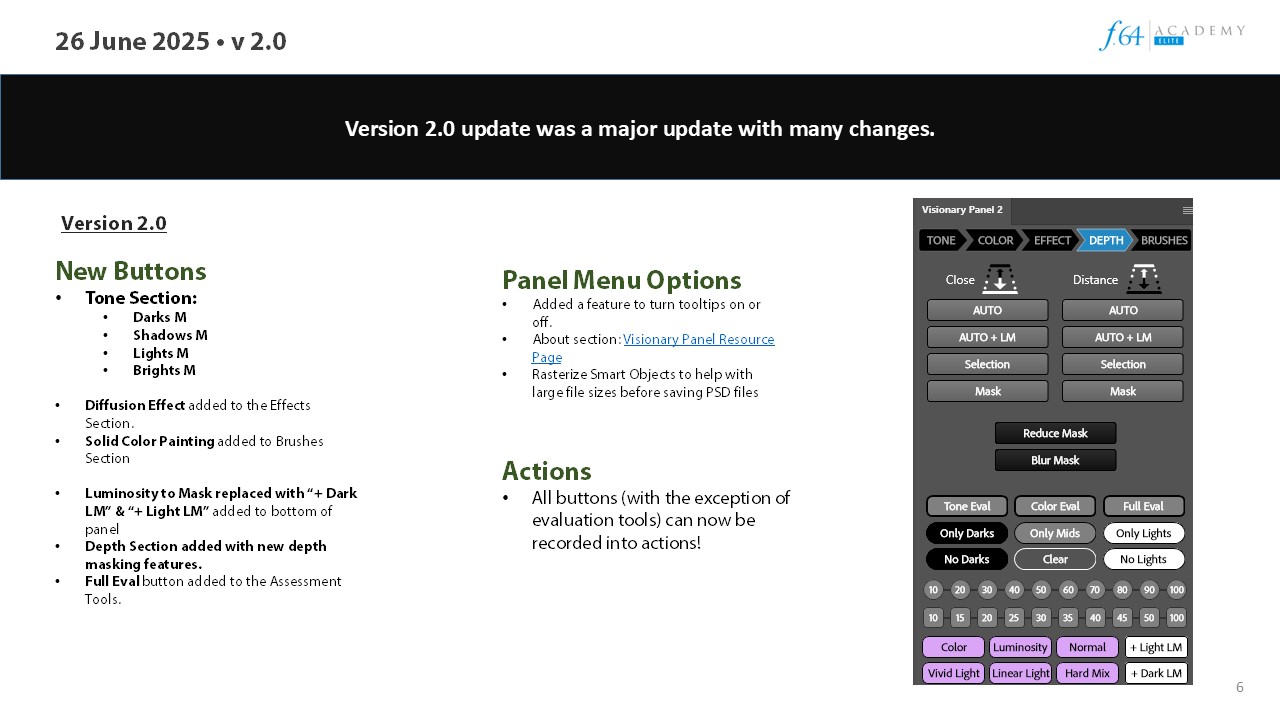
All the Updates to VP 2.0
(Included in the README file)