Visionary Panel Resource Page
Welcome to the Visionary Panel video collection! Here, you’ll find a curated selection of videos to help you make the most of the Visionary Panel. These videos are not meant to replace the education that comes with the panel but to reinforce what you’ve learned with little supplements here and there. These videos will help you unlock the full potential of the Visionary Panel and take your editing to the next level!
Check back often for updates to this page.
The most recent video will always be displayed first.
Reset Brush VP 2.0 Hot Fix
The Reset Brush is supposed to select the reset brush option in the brushes for the Visionary Panel. It may be that the brushes didn’t load properly in your brush palette. Try this.
- Open the brush palette, find any folders that say “Visionary Brushes” and delete them. There may be multiple copies of them. Delete all of them.

- After all brushes are deleted, try to select a brush from the panel (If all are deleted, it won’t select a brush). This is what we want at this point.
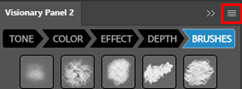
- Go to the menu of the panel and press “Reload Panel”.

- Open the brush palette, you should see “Visionary Brushes” at the bottom. It may have a 0 after it as well.
- Go back into the panel and select the first Visionary brush from the panel; it should change to that.
- Now, try pressing the Reset Brush button.
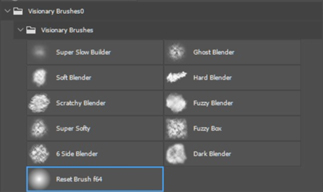
It should reset the brush to a soft-edged brush with all settings back to the PS default for a soft round brush.
A full workflow live event that focused on using the Visionary Panel and other products to make the most of your shots.
A live event that focused on using the Visionary Panel to help you build a plan for editing your images.
A full workflow live event that focused on using the Visionary Panel and other products to make the most of your shots.
A Youtube video that showcases the use of Selective Color and the Selective Color Sliders in the Vsionary Panel.